Affordable data recovery software and services for PCs running Microsoft Windows
           Data Recovery Software & Services - VefiSign Secure Order           Meets allBBBOnLine Reliability participation and Better Business Bureau membership standards.          

Buy Online
  File Scavenger®
  Disk Recoup™

Site Services
  Account Login
  

Language
  English
  Deutsch
  Español
  Français
  Italiano
  Japanese
  Nederlands
  Svenska

Magazine Reviews
  Maximum PC
  Computer Bild
  PC World

Testimonials
What our customers are saying!

   Microsoft Certified Partner

  Buy for $95.00      Try    

File menu


File menu

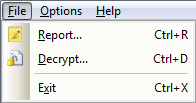
The File menu offers the following commands:

Report

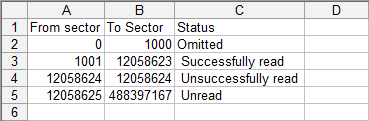
Generates a report on the copying status of the source hard drive. The report is in Microsoft® Excel CSV format, as shown in the screen capture below:
Report

The status can be:

  • Successfully copied.
  • Unsuccessfully copied. The sectors cannot be copied because of an error such as media error.
  • Unread. The sectors have not been read.
  • Omitted. The user explicitly omitted the sectors from the copy operation.

This command is not available in demo mode.

Decrypt

Decrypts a destination hard drive or disk image file that has been earlier copied by Disk Recoup™ in demo mode with encryption.

Exit

Exits Disk Recoup™.


Contact | Privacy | Feedback |   Copyright © 2010 QueTek® Consulting Corporation