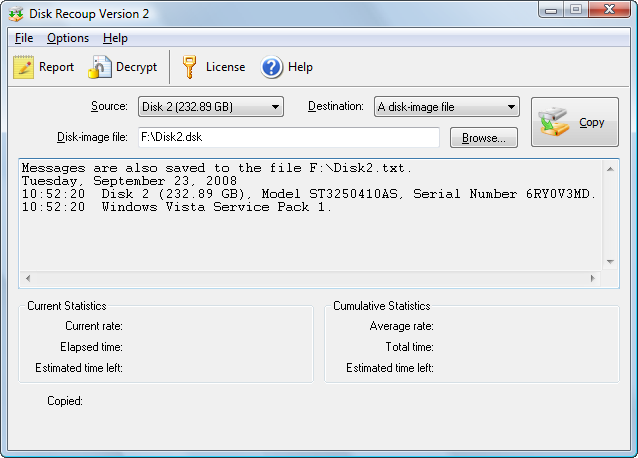
Source
The source hard drive. You can click on "Show drive letters" and then select a drive letter (i.e., volume) as the source. Such an operation is only meaningful if you intend to copy a volume to a disk image file for backup purposes.
Destination
The destination which can be a dedicated blank hard drive or a disk image file.
Disk-image file
If the selection in "Destination" is "A disk-image file", this is the name of the disk-image file.
Session file
If the selection in "Destination" is a dedicated hard drive, you must specify a session file.
Browse
If you are starting a new disk copy session, use this command to create a new disk-image file or session file. See "What is copied?" and "Working disk space".
If you are resuming a previous session, use this command to load the disk-image file or session file you created when the session was initiated.
Copy
Starts copying.
Current Statistics
This box shows the statistics for the last sixty seconds.
- Current rate: Data transfer rate in the last sixty seconds.
- Elapsed time: Time since "Copy" was clicked on.
- Estimated time left: Remaining time calculated from the current rate above.
Cumulative Statistics
This box shows the cumulative statistics from the beginning of this disk copy operation.
- Average rate: Average transfer rate since the copy operation was initiated. If this is a resumed session, this includes all previous runs.
- Total time: Total time the copy operation has taken place, including all previous runs, if any.
- Estimated time left: Remaining time calculated from the average rate above
Note that the estimated time left calculated from the current rate is usually more accurate than the time calculated from the average rate. The two times can be significantly different. The copy operation can be significantly slower near completion because Disk Recoup™ always tries to read the good parts of the disk first. It reads the more troubling parts last and may encounter more timeout errors. Therefore the time calculated from the average rate may be overly optimistic.
|