|
Strategies for deleted files
Deleted files can be recovered until they are permanently overwritten by new data.
The procedures below minimize the number of new files created during the recovery.
Therefore they maximize the chances of a successful recovery.
Procedures for files deleted from the boot drive
The boot drive is usually drive C: and includes such folder as "My Documents", "Desktop", etc.
- Best possible recovery procedure (for experienced PC users):
See "Strategies for an unbootable computer".
- 95% effective recovery procedure (requiring much less work):
- Close all programs including mail, Internet browser, instant messaging, backup, virus protection, local drive search engines,
Windows Automatic updates, etc.
- Disable all shared folders on the drive.
- Use the indirect download and installation procedure.
- Run File Scavenger® as follows:
Look for: *
Look in: The boot drive letter, usually C:
Mode: Quick
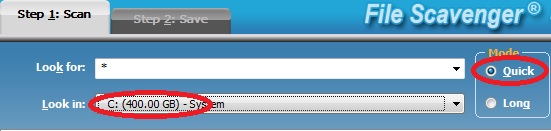
Scan drive C: in mode Quick.
- If files are found and successfully previewed in demo mode, you can use another computer to buy a license and save the files to another drive.
Procedure for files deleted from a non-boot drive
- Close programs that may write to the drive. For example, if the drive contains mail folders, close all mail programs.
- Disable all shared folders on the drive.
-
 Download and try File Scavenger® in demo mode as follows: Download and try File Scavenger® in demo mode as follows:
Look for: *
Look in: The drive letter.
Mode: Quick
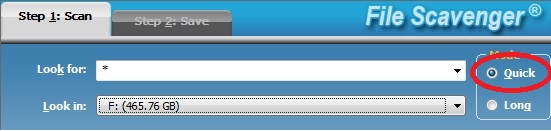
Scan a non-boot drive for deleted files.
- If files are found and successfully previewed in demo mode, you can buy a license and save the files to another drive (such as the boot drive).
Common conditions that reduce the chances of recovery
For a boot drive
The following activities may create new files on the boot drive and permanently overwrite lost files:
- Continue to use the computer, especially for mail and Internet browsing.
Leave other programs running (such as instant messaging, backup, virus protection, local drive
search engines, Windows Automatic Updates, etc.) - Download or install new software (including File Scavenger®) on any drive on the computer.
(The boot drive will be indirectly used even if you specify another drive for download or installation.)
- Continue to let other computers access the boot drive from the network (for example, via a shared folder).
- Save recovered files to the same
drive. (More information)
For a non-boot drive
Any activities creating new files or modifying existing files on the drive will reduce the chances of success.
Back to Table of Contents
|
|